Showing posts with label IT. Show all posts
Monday, 18 May 2015
Hacking Metaspoitable2 without Metaspoit
So been in my new job now for some time and still have not taken my Cisco courses but never mind there is nothing like procrastinating.
So Metaspoitable2 is a vulnerable by design VM that hosts numerous miss-configured" services that will allow exploitation. I downloaded my copy from sourceforge.
For the running the VM I used the latest version of VMware Player, you need to extract the files from the compressed folder, but if you are reading this that should not be a problem for you.
Right so first things first lets start with a basic nmap scan.
As you can see there are many ports running services on Metaspoitable2.
The service I am interested in is nfs running on port 2049.
Now nfs is a network file system or a network share.
So the next plan is to check to see were in the file system the share is located and then attempt to mount it.
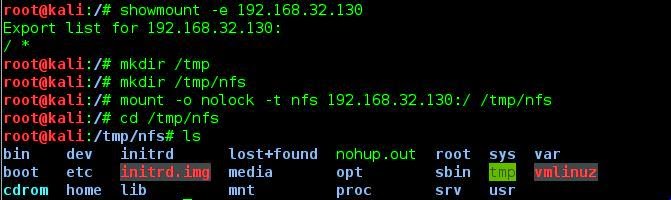
The showmount command gives an output of / * meaning that the root of the directory is shared. I then mounted the nfs into /tmp/nfs now we have control of the file system.
Now this took a little time to get to and now you need to looking at how the system works.
Referring back to the nmap we can see that ssh is enabled.
Now as we have access to the file system it is possible to generate an ssh key and add it to the authorized keys file.
This will allow you to ssh in to Metaspoitable2 as root without having to provide a password, going by the rules of 2 is 1, 1 is none we currently have nothing.
The reason we have nothing is because if a server admin were to update the authorize_keys file then we would loose access. So to ensure access why don't we extract the user passwords for the server.
So as the passwords are encrypted we need to unshadow the passwd and shadow files. The output is then feed into John the Ripper giving 6 usernames and passwords within 2 seconds but not the root password, I left mine running for quite some time and never got the password, however if you ssh in as msfadmin you can use the command sudo su to elevate to root.
Labels:
hacking,
IT,
John the Ripper,
Kali,
Kali Linux,
metaspoilt,
metaspoitable,
metaspoitable2,
nfs,
nmap,
root,
ssh,
sudo
Friday, 3 October 2014
Capturing a WPA handshake.
So latest up date I had an interview about a week ago, walked out of there feeling great. Looks like it payed off, was offered the job and am just finalising the contracts now.
Lets get on to something more interesting than my boring life.
Without getting in to too much WiFi theory to get on to a WPA2 WiFi network the fist step is to capture the WPA handshake.
This is a 4 way handshake between the AP and device that initiates the connection. Basically the AP and device confirming what the pre-shared key is.
I am not trying to teach WiFi theory or anything like that just pass on my process for capturing handshakes, as always you should only be doing this to equipment you own or have permission to audit.
Now you have to start with a WiFi radio that supports packet injection and monitor mode. Offensive Security has a list of suggested hardware here for their WiFu course. Now aircrack-ng is available no windows but I prefer to use Kali Linux.
Now first thing to do is to bring up a monitor interface and personally set a custom MAC address and disable the wlan0 device.
The next step is to run airodump-ng I normally run this twice the first time for reconnaissance, to get my target ESSID , BSSID and channel.
My attack run I use this command:
"airodump-ng --bssid 20:2B:C1:6B:D8:C5 -c 11 -w BTHub3-3M6H --output-format pcap mon0"
Now lets just break this down a little.
--bssid filters by the bssid of the desired AP
-c locks mon0 on to the desired channel
-w names the capture file the out put would be "/root/BTHub3-3M6H-01.cap"the id number at the end will increment.
--output-format sets the desired format of the output file.
Once this has been run you will get an updating output.
Now as you can see we have detected the AP and a client, in this case my iPhone. In order to capture the WPA handshake we need to de-authenticate the client from the AP.
One thing to be careful of at this stage is flooding with deauth's ( -0 attribute ) this exposes the attack as you are actually transmitting, using my method you are only sending 1 deauth so you may need to rerun this command to capture the WPA handshake.
You have now captured a WPA handshake and can go on to break it using a variety of methods.
Here is my You Tube video to go along with this post.
Now here is a list of every command used - items inside {} are variables that you need to set.
airmon-ng start {wifi interface}
ifconfig {wifi interface} down
ifconfig {monitor interface} down
macchanger -m{desired MAC address} {monitor interface}
ifconfig {monitor interface} up
airodump-ng {monitor interface}
airodump-ng --bssid {bssid} -c {channel} -w {title} --output-format pcap {monitor interface}
airepaly-ng -0 1 -a {bssid} -c {client MAC} {monitor interface}
Lets get on to something more interesting than my boring life.
Without getting in to too much WiFi theory to get on to a WPA2 WiFi network the fist step is to capture the WPA handshake.
This is a 4 way handshake between the AP and device that initiates the connection. Basically the AP and device confirming what the pre-shared key is.
I am not trying to teach WiFi theory or anything like that just pass on my process for capturing handshakes, as always you should only be doing this to equipment you own or have permission to audit.
Now you have to start with a WiFi radio that supports packet injection and monitor mode. Offensive Security has a list of suggested hardware here for their WiFu course. Now aircrack-ng is available no windows but I prefer to use Kali Linux.
Now first thing to do is to bring up a monitor interface and personally set a custom MAC address and disable the wlan0 device.
The next step is to run airodump-ng I normally run this twice the first time for reconnaissance, to get my target ESSID , BSSID and channel.
My attack run I use this command:
"airodump-ng --bssid 20:2B:C1:6B:D8:C5 -c 11 -w BTHub3-3M6H --output-format pcap mon0"
Now lets just break this down a little.
--bssid filters by the bssid of the desired AP
-c locks mon0 on to the desired channel
-w names the capture file the out put would be "/root/BTHub3-3M6H-01.cap"the id number at the end will increment.
--output-format sets the desired format of the output file.
Once this has been run you will get an updating output.
Now as you can see we have detected the AP and a client, in this case my iPhone. In order to capture the WPA handshake we need to de-authenticate the client from the AP.
One thing to be careful of at this stage is flooding with deauth's ( -0 attribute ) this exposes the attack as you are actually transmitting, using my method you are only sending 1 deauth so you may need to rerun this command to capture the WPA handshake.
You have now captured a WPA handshake and can go on to break it using a variety of methods.
Here is my You Tube video to go along with this post.
Now here is a list of every command used - items inside {} are variables that you need to set.
airmon-ng start {wifi interface}
ifconfig {wifi interface} down
ifconfig {monitor interface} down
macchanger -m{desired MAC address} {monitor interface}
ifconfig {monitor interface} up
airodump-ng {monitor interface}
airodump-ng --bssid {bssid} -c {channel} -w {title} --output-format pcap {monitor interface}
airepaly-ng -0 1 -a {bssid} -c {client MAC} {monitor interface}
Tuesday, 16 September 2014
Looks like I have been silent.
Well hi looks like I have been neglecting my blog.
Well in the last few months I have been given notice on my current contract, I have a few weeks left working at my current site and don't yet have a replacement. Good job that I have some savings, I could take a long holiday and I would end up maybe making a few more posts but is anyone even reading this?So what have I been doing mostly studying for my MCSA on Server 2012, and guess what I have passed. I'm now looking for infrastructure jobs so here is hoping I can get a nice job in London.
I really do need to get my shit together a new WiFi Pineapple firmware was released at DEFCON, witch I once again missed really hoping to make the trip to Vegas next year. Its now 03:14 and I'm hoping to get something on here at the weekend, I'm currently studying for CCENT so I am hoping that I will be able to do something along the network side of life.
Subscribe to:
Posts (Atom)